Developer’s Guide
Description of Branches
There are several primary repository branches for specific development tracks.
main
This is the stable release branch. It is updated from the develop branch and tagged prior to each release. The melodies-monet conda package is created from main.
develop
This is the parent branch in which to consolidate the various development tracks. General practice, when working within the central repository, is to create a working branch, branched from develop, with a naming convention such as develop_topic. The develop_topic branches are merged back to develop via pull requests. Forks of the central repository should follow the same branching conventions.
Setting up your development environment
In order to prepare for developing MELODIES MONET, we clone the repositories and create a conda environment that references them.
Note
If you are installing MELODIES MONET on NCAR Casper or NOAA Hera follow these machine specific instructions instead.
Important
The instructions below are for cloning a repository using SSH. If you prefer, you can also clone the monet, monetio, and MELODIES-MONET repositories using HTTPS [1].
To install MELODIES MONET on your laptop or on HPC machines in general follow these instructions:
Set up a conda environment with all the dependencies, including MONET and MONETIO:
$ conda create --name melodies-monet python=3.11
$ conda activate melodies-monet
$ conda install -y -c conda-forge pyyaml pandas=1 'matplotlib-base<3.9' monet monetio netcdf4 wrf-python typer rich pooch jupyterlab
Clone [1] and link the latest development versions of MONET and MONETIO from GitHub to your conda environment:
$ git clone git@github.com:noaa-oar-arl/monet.git
$ cd monet
$ git checkout develop
$ pip install --force-reinstall --no-deps --editable .

$ git clone git@github.com:noaa-oar-arl/monetio.git
$ cd monetio
$ git checkout develop
$ pip install --force-reinstall --no-deps --editable .
Clone [1] and link the latest development version of the MELODIES MONET:
$ git clone git@github.com:NCAR/MELODIES-MONET.git
$ cd MELODIES-MONET
$ git checkout develop
$ pip install --force-reinstall --no-deps --editable .
How to incorporate updates to MELODIES MONET
In order to contribute code to MELODIES MONET, you will need to fork the repository, make changes on your fork, and submit a pull request with your changes.
Fork the GitHub repository to your own GitHub account using the “Fork” button near the top right:
https://github.com/NCAR/MELODIES-MONET
Note
You can pull updates from the main NOAA repository by using the “Fetch Upstream” button on your fork. Alternatively: [1]
$ git remote add upstream git@github.com:NCAR/MELODIES-MONET.git
$ git pull upstream main
$ git push origin main
Navigate on your working machine to where you would like to keep the MELODIES-MONET code (e.g. in your work location) and clone [1] your fork:
$ git clone git@github.com:$GitHubUsername/$ForkName.git
Checkout the develop branch — you need to do this with the remote branch as well as create a local tracking branch:
$ git checkout origin/develop
$ git checkout develop
Then all development work will be in the
melodies_monetfolder.$ cd melodies_monet
Make changes to your fork.
Submit a pull request back to the main MELODIES MONET repository with your changes.
Contributions to the Docs
If you add a component to MELODIES MONET, please follow the instructions below to update the readthedocs user guide.
This User’s Guide has been generated by the Sphinx documentation system. This requires adding the following packages to your conda environment in order to build the HTML docs.
Either use the docs/environment-docs.yml file [2]
from the MELODIES MONET repository,
or add the following packages to your conda environment manually:
$ conda install -y -c conda-forge sphinx sphinx_rtd_theme myst-nb sphinx-design sphinx-click sphinx-togglebutton typer
The restructured text sources (rst) are located in the MELODIES-MONET/docs folders. The rst files may be edited and new files added to document any package modifications or new MELODIES MONET components.
To build the HTML docs:
$ cd docs
$ make clean
$ make html
The generated HTML will be created in docs/_build/html,
with docs/_build/html/index.html the main page that can be
viewed in any browser.
Please refer to the MELODIES MONET project board to learn more about our current and future documentation plans.
Code workflow
The way the code is constructed (see Software Architecture)
is based largely on code contained within a driver (driver.py).
The main class, contained in driver.py, is analysis.
analysis is in charge of creating and managing all other classes.
This driver contains the observation, model and pair classes,
using the tools that can be found in util.
Even though, right now, the driver.py is quite large,
we are working on reducing its complexity and,
as far as possible, managing most with specific utilities.
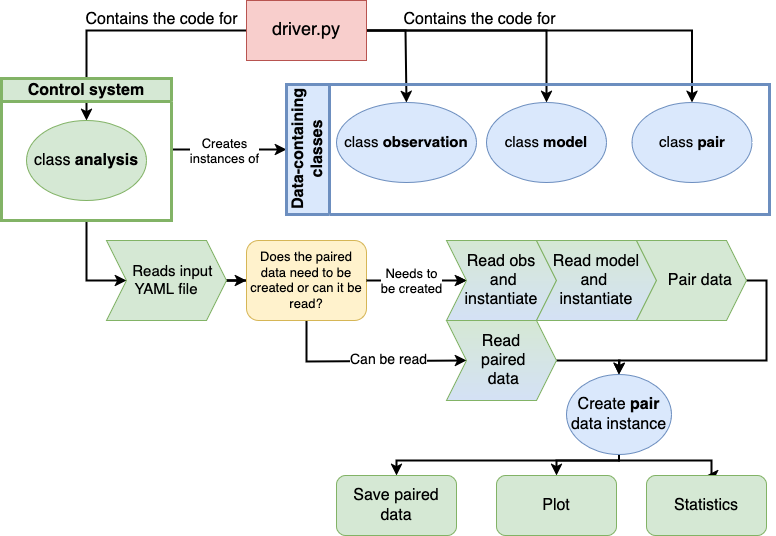
Generalized structure of the code and its workflow.